


Making money online is never as simple as those “buy my course” gurus make it look.
I know, because I’ve been trying for years!
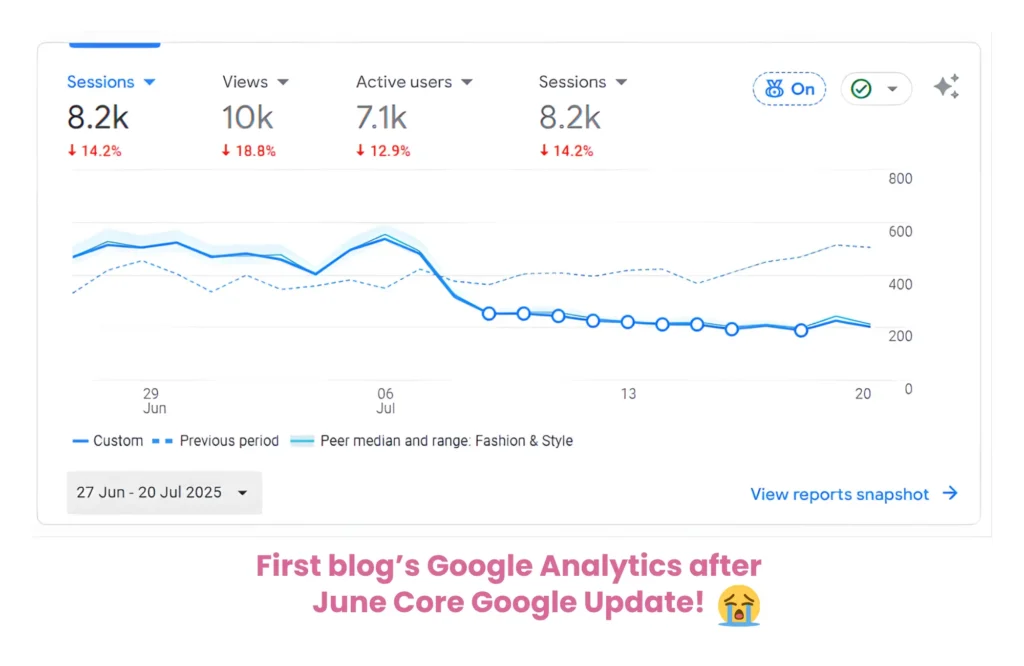
My first blog actually did get monetized, but it took two and a half years to get there. Then the Google update of June 2025 basically OBLITERATED it overnight. 😭
PIN FOR LATER 📌
All that work, all that carefully crafted SEO content, just… gone!
It was a painful reminder that building entirely on Google can feel like building on shaky ground, especially now with AI Overviews changing the game and everyone pumping out AI-generated content at record speed.
So I pivoted. Hard.
I started this blog at the end of September 2025, and this time I did things completely differently.
I went all in on Pinterest SEO, no Google-chasing, no shortcuts, just a clear strategy and a lot of consistency.
And as of April 2nd, 2026, just six months later, this blog was accepted into Journey by Mediavine. 😁
I’m not here to sell you a thing. I just want to share exactly what I did, so let’s get into it!
What is Journey by Mediavine
So first, let me explain what Journey by Mediavine is.
You may have already heard of Mediavine; it’s one of the most well-respected display ad networks in the blogging world.
But getting into full Mediavine requires 50,000 sessions a month, which, let’s be honest, feels a little out of reach when you’re just starting out.
Journey is their answer to that.
It’s essentially Mediavine’s entry-level ad program, designed specifically for smaller and growing blogs, and honestly, the requirements are a lot more accessible than you might think!
Originally, you needed at least 10,000 sessions a month, but they’ve recently dropped their minimum sessions all the way down to just 1,000 sessions a month.
I actually applied at just over 8,000 sessions, but knowing that bar exists makes it feel genuinely achievable even in the early days.
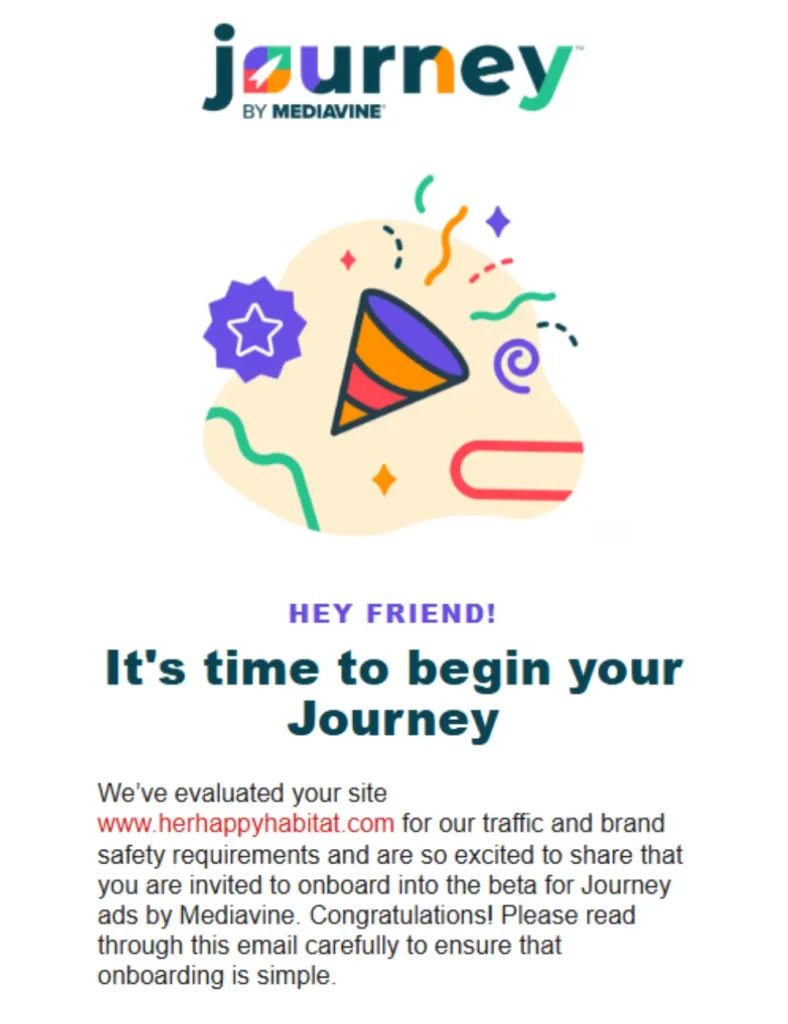
Beyond sessions, here’s what they’re looking for:
- Original, brand-safe content
- An engaged audience (Mediavine has a helpful breakdown of exactly what engagement metrics they care about, worth a read before you apply)
- Content that is frequently updated
- Enough premium traffic to offset any non-premium traffic
- Note that if your website changes ownership, you’ll need to reapply — this also applies to current publishers
The ads are display ads, meaning they sit within and around your content and earn you money based on impressions, so every single page view counts.
It’s completely passive income once it’s set up, which is kind of the dream, right?
What I love about Journey specifically is that it’s not just a consolation prize for blogs that can’t get into full Mediavine.
It’s a genuine stepping stone, and the Mediavine team is known for actually supporting their publishers. For a six-month-old blog, getting that acceptance email felt like a pretty big deal.
YOU MAY ALSO LIKE:

22 Christmas Ornaments to Make and Sell (Start Now, Thank Me in December)

30 Digital Products to Sell on Etsy (No Shipping, No Inventory, No Trip to the Post Office)

100 Etsy Shop Name Ideas (Plus How to Check If Yours Is Taken)

25 Best Careers for Creative Introverts That Can Actually Pay Well


12 High-Paying Work-From-Home Jobs That Are Actually Worth Your Time
Why I Chose Pinterest Over Google
Google is just not as reliable for consistent traffic as it used to be.
Putting SO much effort into your blog only to be at the mercy of their numerous updates per year is not stable ground to build a long-term business on.
And with AI Overviews and AI Mode now in the mix, I honestly can’t see it getting any better for bloggers anytime soon.
And it’s not just small bloggers feeling this. Some of the biggest names in media have taken a serious hit, too.
Data from analytics firm Similarweb, cited by The Wall Street Journal, showed some pretty eye-watering declines in organic search traffic across major publishers.
- HuffPost’s traffic more than halved over three years.
- The Washington Post saw nearly the same level of decline.
- Business Insider reported a 55% drop and recently laid off 21% of its workforce.
- Even The New York Times watched its share of organic search traffic shrink from almost 44% in 2022 to 36.5% in April 2025.
If it’s happening to them, it’s definitely happening to us! 😟
So when my first blog got hit hard by the June 2025 Google core update, I didn’t just want to rebuild the same thing and hope for a different result.
I wanted a platform that I could *actually* rely on. One that wasn’t going to pull the rug out from under me every few months.
That’s where Pinterest came in.
Just one more thing worth knowing before we get into the Pinterest strategy, and honestly, it only made me more confident in my decision.
According to Social Shepherd, 70.3% of global Pinterest users are female, and in the US alone, there are 58.9 million female users compared to 32.6 million male users, so pick female-friendly topics!
The US also makes up the largest share of Pinterest’s traffic at 36.65%, which is significant because US traffic is exactly what ad networks like Journey by Mediavine value most for premium RPMs.
How I Planned My Pinterest Strategy
The first thing to know about Pinterest is that it’s not just a mood board for wedding inspo and home decor; it’s actually a visual search engine.
Think of it like Google, but instead of returning a list of blue links, it serves up images and graphics that click through to blog posts, products, and websites.
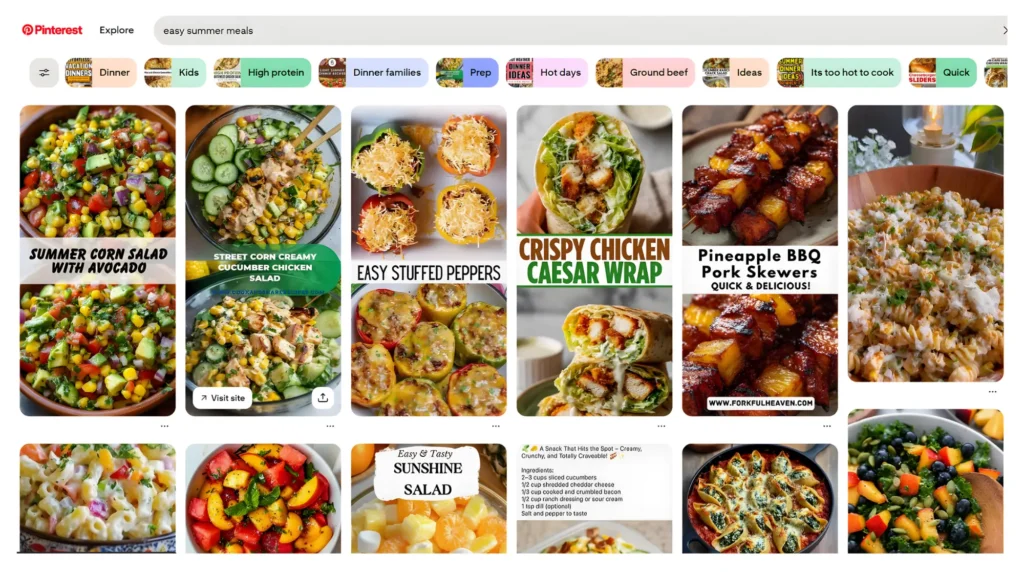
People come to Pinterest with intent, actively searching for ideas, solutions, and inspiration, which means the traffic it sends your way is genuinely warm and engaged.
And unlike Google, one well-performing pin can keep driving traffic to your site for months, even YEARS, without you touching it again.
Awesome right?
So in terms of my strategy, first things first… I had to choose a Pinterest AND female-friendly niche as I mentioned earlier.
As Pinterest is an image-focused platform, some niches naturally perform better than others.
The sweet spot is anything that’s visually appealing, solution-driven, or aspirational. Think:
- Food and recipes
- Home decor and interior design
- Travel
- Fashion and beauty
- Wellness and self-care
- Personal finance and money tips
- Parenting
- DIY and crafts
I knew pretty early on that home decor was going to be my primary focus, specifically, small apartment living.
It’s honestly one of the most searched niches on Pinterest; people are constantly looking for ways to make the most of a smaller space, and the content is incredibly visual, which is exactly what Pinterest rewards. 🏆
I layered in recipes, DIY and crafts, and some wellness and self-care content too, which gave me a broader content base without straying too far from the cozy, lifestyle-y feeling that tends to do really well on the platform.
Choosing a niche that was both Pinterest-friendly and something I actually wanted to write about made a huge difference.
Consistency is everything with Pinterest, and it’s a lot easier to stay consistent when you genuinely like what you’re creating.
Setting Up Pinterest For Blog Traffic: A Step-by-Step Guide
Setting Up A Pinterest Business Account
First things first, you need a free Pinterest business account, not a personal one!
A business account gives you access to Pinterest Analytics, audience insights, and the ability to verify your website, all of which are *really* important for growing your blog traffic intentionally.
Setting one up is straightforward and completely free. Here’s how:
- Head to pinterest.com and click “Sign up” in the top right corner
- Look for the “Create a free business account” link below the main sign-up form and click that
- Fill in your details and follow the guided setup steps, making sure you select “Business Account” so you unlock all the good stuff from the start!
- Choose a username that’s as close to your blog or brand name as possible — this becomes your Pinterest URL, so something clean and memorable works best
- Work through Pinterest’s onboarding steps, and when prompted, select “Build your profile”
Once your account is live, one of the first things you’ll want to do is claim your website.
This is a biggie.
Verifying your website confirms to Pinterest that you own your domain, unlocks detailed analytics, and increases your pin visibility.
You can find this under Settings, then Claimed Accounts. The exact verification steps vary slightly depending on your website platform, but Pinterest walks you through it, and it’s usually done in minutes!
💡QUICK TIP: Don’t forget to set your region to the United States!
Optimizing Your Pinterest Profile
Think of your Pinterest profile as your storefront; it needs to tell people exactly who you are and what they’ll get from following you, within seconds.
Here’s what to focus on:
Display name: Don’t just put your blog name and leave it at that. Use your display name as prime keyword real estate.
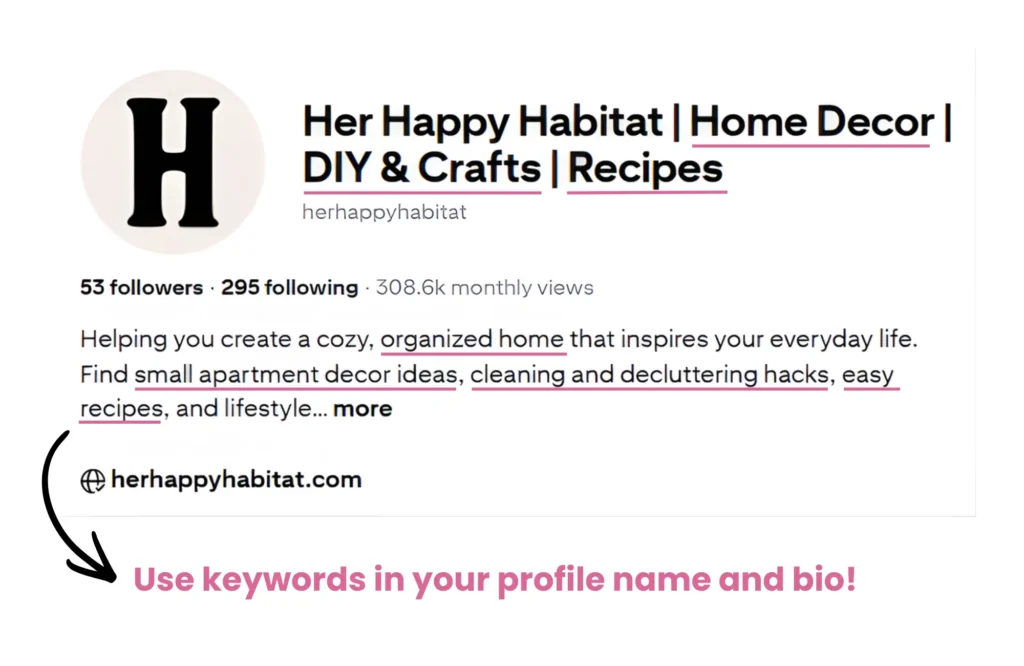
Mine reads “Her Happy Habitat | Home Decor | DIY & Crafts | Recipes” — clear, searchable, and immediately tells Pinterest (and people) what my content is about.
Bio: Keep it warm but keyword-rich. Mine reads: “Helping you create a cozy, organized home that inspires your everyday life. Find small apartment decor ideas, cleaning and decluttering hacks, easy recipes, and lifestyle tips to make your home (and routine) feel happier.” No fluff, just a clear picture of what I offer and who it’s for.
Profile photo: This is personal preference, but you can use either a professional headshot or a brand logo. I use a logo for Her Happy Habitat because it keeps things looking cohesive, but if you’re a personal brand, your face can actually build a stronger connection with your audience.
Claim your website: If you haven’t done this already, go back and do it now. It’s that important.
As for boards, I currently have 253 — and yes, I know that sounds like a lot, but Pinterest actually allows up to 2,000, so it’s really not.
The key thing is I didn’t create them all at once. I only ever created a new board when I had relevant content to put in it.
More boards mean more opportunities to target specific keywords, which helps Pinterest connect your content to exactly the right people.
Quality and relevance over quantity, always!
Creating Your Boards
Your boards are essentially your filing system, and how you name and organize them matters more than most people realize.
Pinterest reads your board names and descriptions as keywords, so vague names like “Home” or “Food” are a missed opportunity.
Go specific. Think “Small Apartment Living Room Ideas” over “Living Room,” or “Easy Weeknight Dinner Recipes” over “Recipes.” That specificity is what helps Pinterest connect your content to people actively searching for it.
I used Pinterest Trends to identify what people were actually searching for before creating my boards, which I’d highly recommend as a starting point.
It’s free, it’s built right into Pinterest, and it takes the guesswork out of what content is worth creating.
Content Strategy and Keyword Research
Knowing What Content To Create And When
One thing I learned pretty quickly, which my analytics from October through December will reflect, is that leaning too heavily on seasonal content is only ever a short-term win.
I started this blog at the end of September 2025, so I naturally created content and boards around Halloween and Christmas topics. Impressions picked up nicely for both, but outbound clicks were minimal, and once the holidays were over?
Impressions tanked almost overnight!
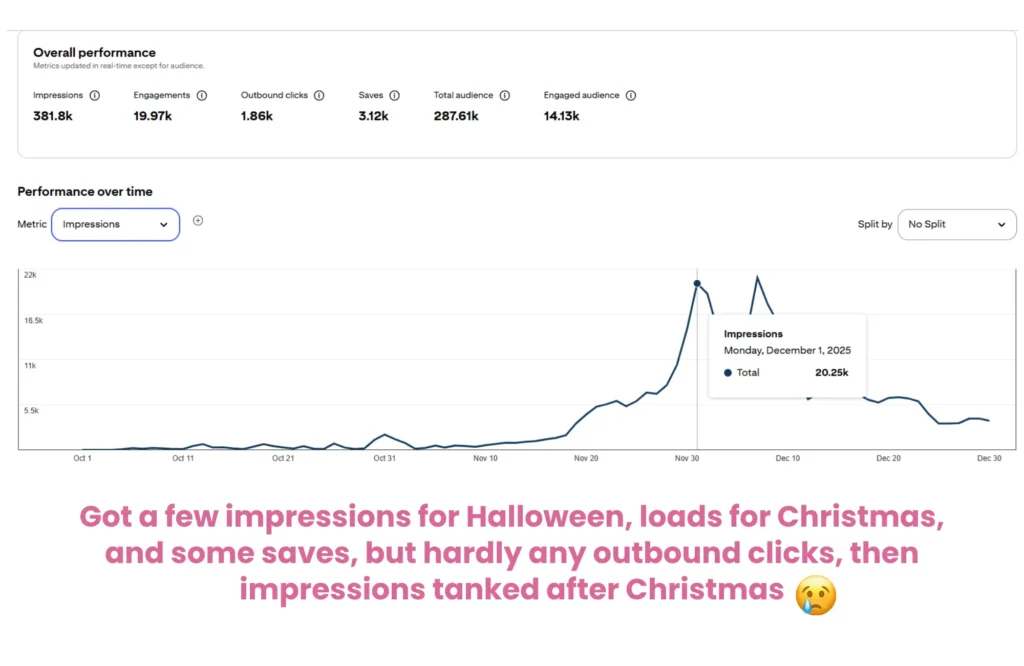
That experience shaped my whole approach going forward. I now work to a roughly 70/30 split — around 70% evergreen content that stays relevant year-round, and 30% seasonal.
Seasonal content can give you a nice traffic spike, but evergreen is what builds sustainable, long-term growth. Both have their place, just don’t let seasonal content dominate your strategy.
Keyword Research On Pinterest
Keywords are EVERYTHING on Pinterest. They’re how the algorithm understands your content and connects it to the right people, so getting this right is really important.
The good news is you don’t need any fancy paid tools to get started — I relied solely on two free resources for my first four months, and they got me to where I needed to be.
Pinterest Trends
Pinterest Trends is genuinely one of the most underrated free tools out there.
Head to trends.pinterest.com and you can search any topic or keyword to see how search interest has changed over time, what’s trending right now, and what’s picking up momentum.
It’s incredibly useful for planning your content calendar, spotting seasonal opportunities early, and finding the exact language people are using when they search.
I used it constantly in those early months to figure out what to write about and what to name my boards.
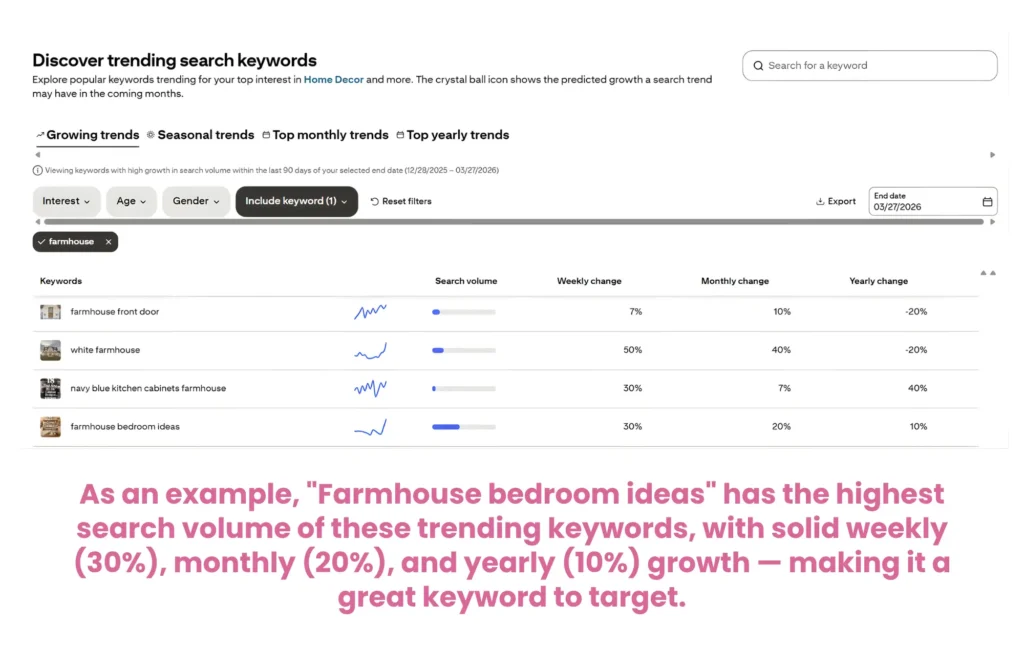
Continuing with the example, when I clicked on the “farmhouse bedroom ideas” keyword on Pinterest Trends, I then got to see its interest over time.
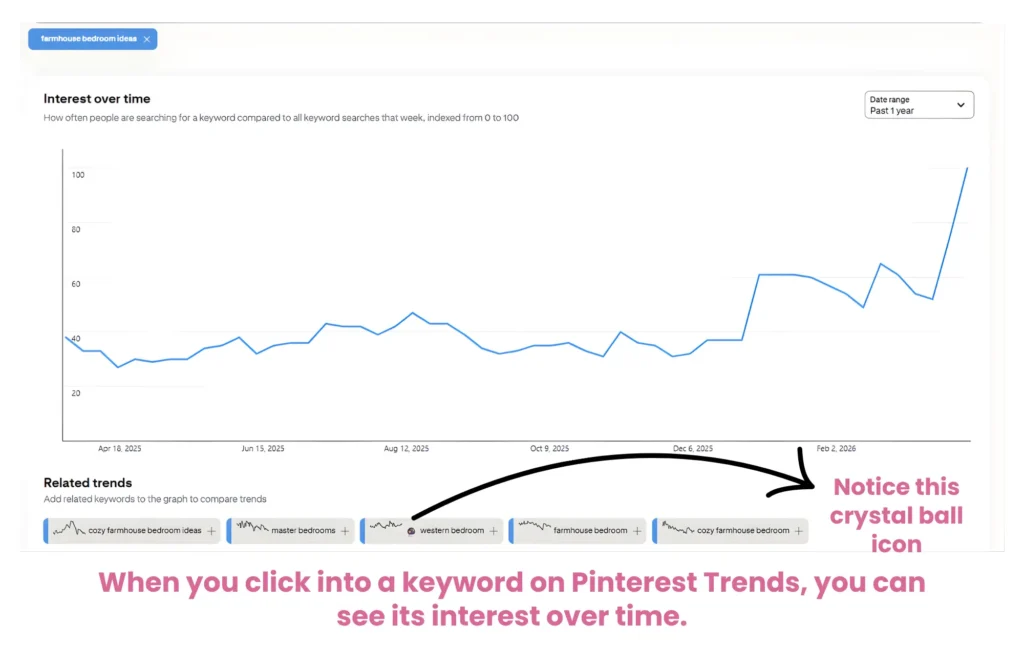
“Farmhouse bedroom ideas” hovered steadily between 30–50 for most of 2025, then shot up to 100 — the maximum score — by mid-March 2026, meaning it’s at peak popularity right now.
Pinterest also suggests related keywords like “cozy farmhouse bedroom ideas,” “master bedrooms,” “western bedroom,” “farmhouse bedroom,” and “cozy farmhouse bedroom”, giving you even more content ideas to create pins around.
You’ll also notice a crystal ball icon next to “western bedroom”. That just means Pinterest is predicting this keyword will grow in the coming months, so creating content around it now could put you ahead of the curve!
The Pinterest Search Bar
This one is so simple but really effective. Just start typing a keyword into the Pinterest search bar, and it will auto-suggest related searches.
These are real terms that real users are searching for, which makes them gold for your pin titles, descriptions, and board names.
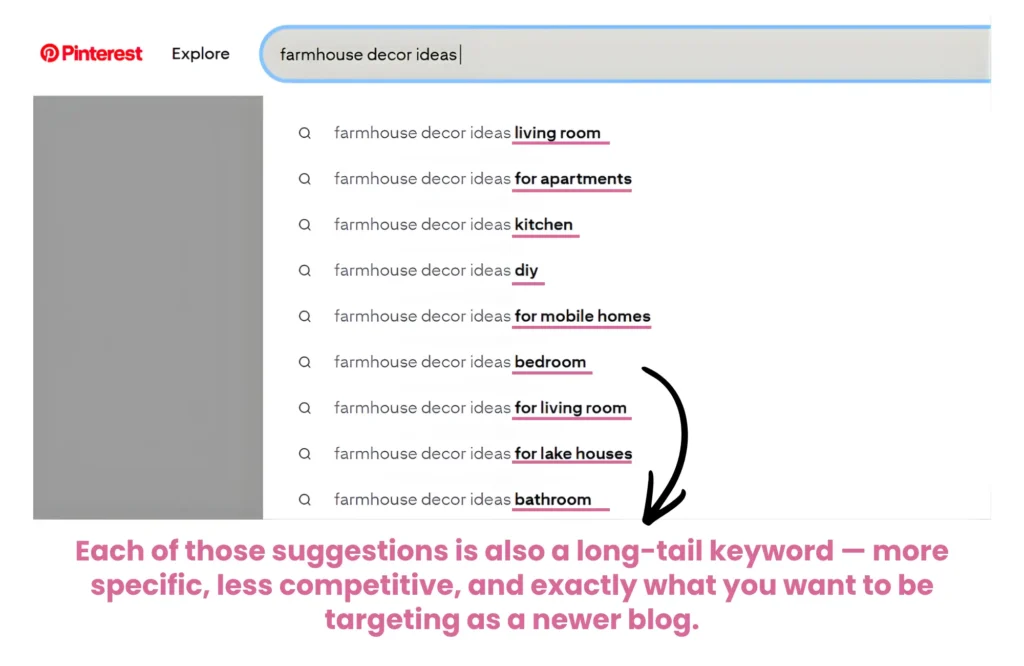
For example, typing “farmhouse decor ideas” pulls up suggestions like “living room,” “for apartments,” “kitchen,” “DIY,” and “for mobile homes.”
Each one of those is a potential blog post, a board name, or a pin title right there!
You’ll also notice colored keyword bubbles appearing at the top of search results.
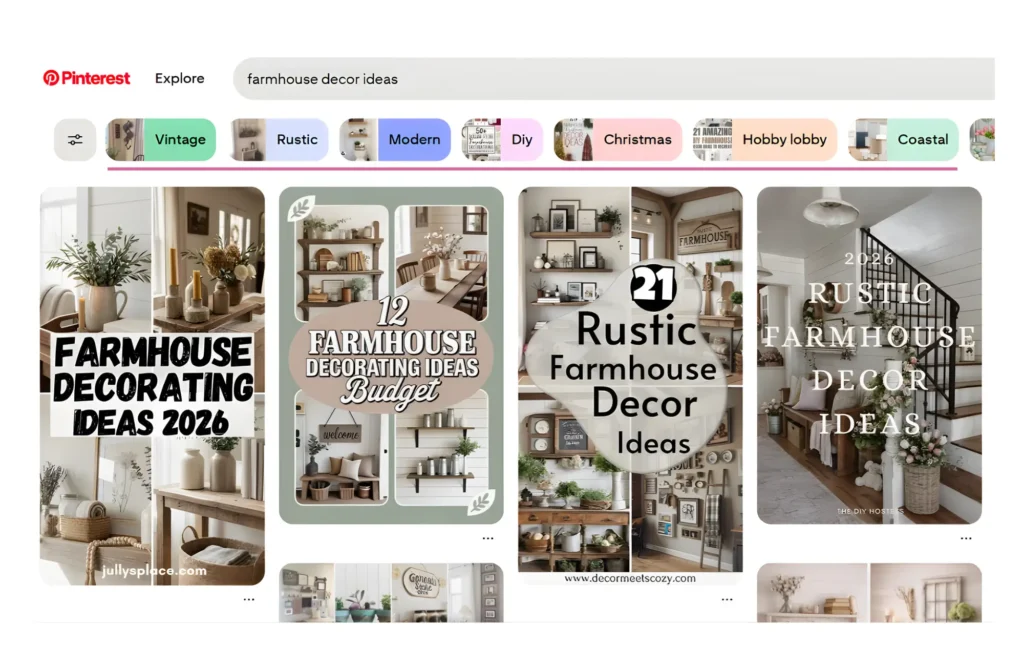
These are Pinterest’s own suggested categories related to your search, and clicking through them helps you uncover more specific, long-tail keywords you might not have thought of yourself.
So, for example, using these keyword bubbles in the screenshot above, you could have:
- Vintage farmhouse decor ideas
- Rustic farmhouse decor ideas
- Modern farmhouse decor ideas
- DIY farmhouse decor ideas
- Christmas farmhouse decor ideas
PinClicks
From February this year, I also started incorporating PinClicks into my strategy, and I haven’t looked back since!
Think of it as Pinterest Trends, but without the limits.
It gives you access to over 12 million official Pinterest keywords with actual search volume data pulled directly from Pinterest, so instead of guessing which terms will work, you’re targeting the exact phrases the algorithm recognizes.
You can also analyze top-performing pins for any keyword and include the annotated keywords for it in your own pins, study competitor accounts, and track how your own pins are ranking over time.
PinClicks is a paid tool starting at $29 a month, but I want to be clear — you absolutely do not need it when you’re starting out!
The free tools will take you a long way. That said, if you’re ready to level up your strategy, it’s worth every penny.
You can sign up for PinClicks HERE.
Here’s a helpful PinClicks walkthrough, if you’re considering it:
Designing Your Pins
Let’s talk pin design, because this matters more than most people think.
I use Canva Pro to design all my pins, but the free version works perfectly well when you’re just starting out.
The reason I upgraded to Pro comes down to a few things that genuinely save me time: a full brand kit where I store my logo, fonts, and color palette so everything stays consistent, one-click background removal for cleaner images, access to over 100 million premium photos and graphics, one-click resizing, and a much larger template library to work from.
Worth it for me, but not essential on day one. They also have plenty of free Pinterest pin templates to choose from.
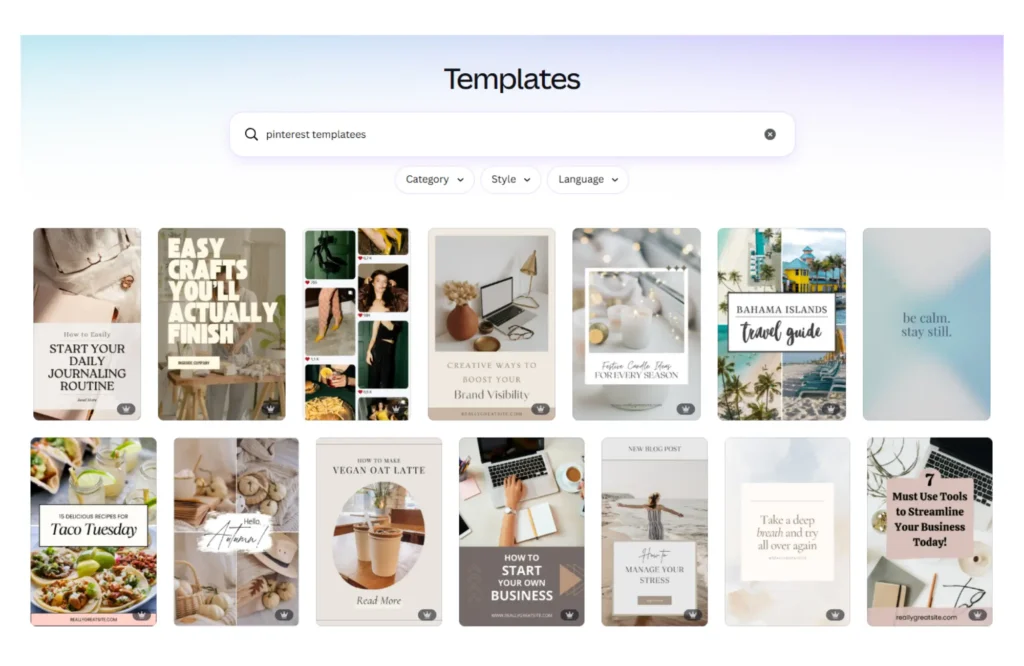
Now, when it comes to actually designing your pins, go big or go home. Seriously.
I recently watched a video by blogger Malena Permentier, who makes well over $10k a month from her blog, and her advice stuck with me: when you think your text is big enough, make it even bigger!
I honestly think I could still push mine further.
Pinterest is a fast-scrolling platform, and your pin has about half a second to stop someone mid-scroll, so bold, readable text is non-negotiable.
Every pin should have:
- A bold, keyword-rich title — this is your hook, make it clear and specific
- Large, readable text — if you have to squint, it’s too small
- A strong image — clean, high quality, and relevant to your content
- Your website URL — subtle but important for brand awareness
- The correct dimensions — Pinterest favors a 2:3 ratio, so 1000 x 1500px is the sweet spot
One more thing worth flagging here, and it’s a mistake I made on my first blog, so learn from me on this one. Make sure most, if not all, of your pins have a text overlay.
On my first blog, which was in the fashion and beauty niche, I pinned so many plain image pins, outfits, nail designs, makeup looks, and they would get a ton of saves, but barely any outbound clicks!
And when you think about it, it makes total sense. 🤔
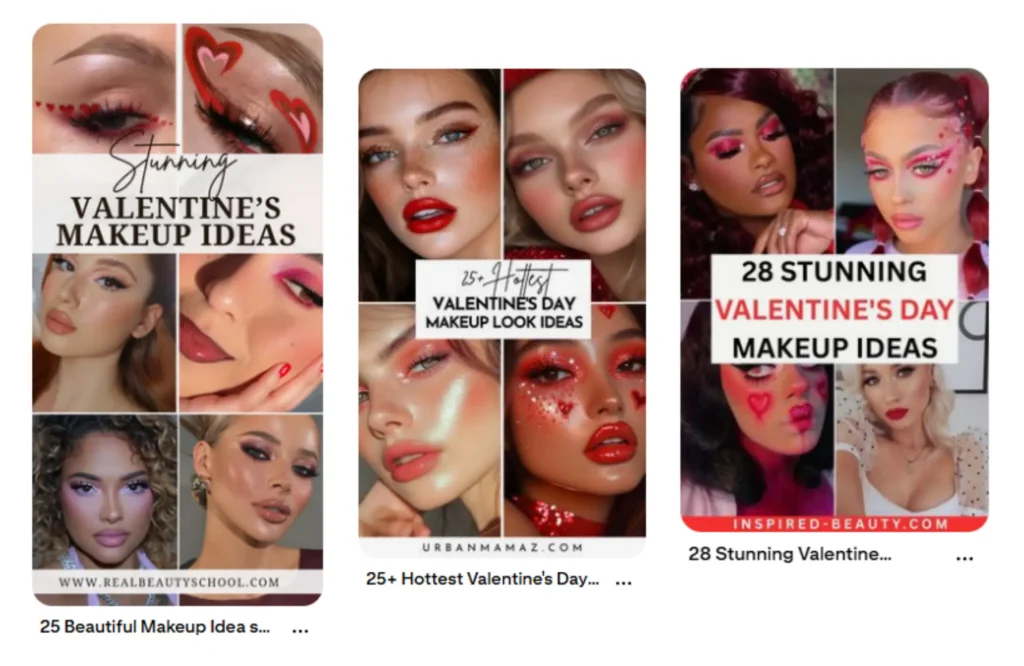
If someone is searching for Valentine’s Day makeup looks and they come across a beautiful image they like, they’ll save it as a reference and move on.
They already got what they needed from the image alone. There’s nothing pulling them through to your actual website.
Instead, if you’re writing a roundup post, create a pin that features multiple images from that post and add a text overlay, something like “10 Valentine’s Day Makeup Looks You Need To Try.”
Now the reader knows there’s more where that came from, and suddenly clicking through actually makes sense. That simple change will convert so much better, trust me!
Here are some examples of what that type of pin should look like:
My Pinning Strategy
You don’t need to pin hundreds of times a day, but you do need to show up regularly.
I currently use Pinterest’s native scheduler to pin between 10 and 15 pins a day, which feels manageable without being overwhelming.
One rule I stick to religiously: I never pin the same URL within a 7-day period. Repeating the same link too soon can flag your account as spammy, so spacing things out is important!
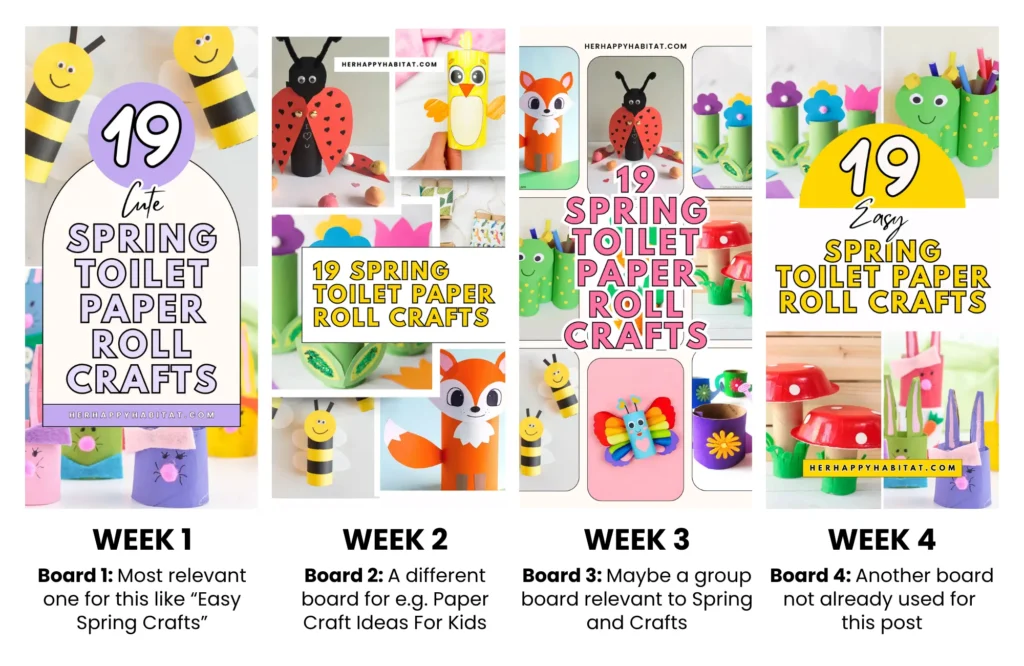
Create multiple pin designs for the same blog post; different images, different text overlays, different layouts — and rotate them out over time.
Each one links to the same URL, but you’re pinning to different boards each time and spreading them out across weeks, which keeps your content fresh without triggering any red flags.
It also gives you more chances for a pin to land with different audiences, since not everyone responds to the same visual style.
Here’s an example of what I mean:
One thing to be aware of with Pinterest’s native scheduler is that it only allows you to schedule 100 pins at a time and up to one month ahead.
It works perfectly well when you’re starting out, but as your content library grows, you might find it a little limiting.
That’s where Tailwind comes in.
Tailwind is a third-party Pinterest scheduling tool that lets you plan and schedule pins up to a year in advance, which is incredibly useful for batching your content.
As my blog grows, I’m planning to experiment with it myself.
That said, opinions on Tailwind in the blogging community are genuinely divided.
Some bloggers swear by it and credit it with helping them scale their Pinterest presence significantly.
Others are skeptical, reporting that it negatively affected their account reach, and some are simply uncomfortable giving a third-party tool access to their Pinterest account.
My honest take?
It’s worth researching for yourself before committing, and as always, what works for one blogger won’t necessarily work for another.
Final Thoughts
Six months ago, I was starting over from scratch, rebuilding after watching my first blog get wiped out by a Google update.
It wasn’t the most fun I’ve ever had, haha! But it pushed me to do things differently, and I’m genuinely glad it did.
Building this blog on Pinterest SEO instead of Google has felt like building on solid ground for the first time.
The growth has been steady, the traffic has been consistent, and getting that Journey by Mediavine approval email at just six months in felt like real confirmation that the strategy was working.
I’m not going to pretend it happened without effort; there were plenty of early mornings, a steep learning curve, and more than a few pins that went absolutely nowhere.
But the framework is there, and it works.
If you’re starting a blog from scratch, or you’re feeling disillusioned with Google and wondering if there’s another way, I really hope this post has shown you that there is!
You don’t need a huge audience, a big budget, or years of experience. You need a Pinterest-friendly niche, a solid strategy, consistency, and a little patience.
Start with what you have. Create good content, optimize it for Pinterest, show up every day, and trust the process.
The results will follow!
FAQs
Yes, and honestly, you’re probably already competing with people who do. I use AI to outline posts, identify what I should be covering, and tidy up my writing, but the bulk of the content, the voice, the personal experience, and the opinions are all mine. If you do use AI, keep your own touch and don’t let it flatten your personality out of your writing. One thing I’d strongly recommend avoiding though is AI-generated images, particularly for food content. Ad networks like Mediavine and Raptive are increasingly strict about this, and it could affect your eligibility for premium ads. Use AI as a helpful tool to work smarter, not as a replacement for your own voice.
It took just 4 days for my site to get approved, but it can vary. If you haven’t heard anything after a month, I’d recommend reaching out to their team directly.
You need at least 1,000 sessions in the previous month. When you apply, they’ll ask you to connect your Google Analytics account so they can verify this themselves, so make sure that’s set up and tracking correctly before you apply.
Build up gradually rather than going all in from day one. I’d suggest 3 to 5 pins a day in your first month, increasing to 5 to 10 in month two, then 10 to 20 from month three onwards as your content library grows.
A business account won’t directly make you money, but it gives you access to Pinterest Analytics, which is essential for understanding what’s working and growing your traffic intentionally. More traffic means better monetization prospects, so yes — get the business account.
For visually driven niches, Pinterest can absolutely outperform Google, and unlike Google, it isn’t subject to the kind of dramatic traffic swings that come with Core updates. You can genuinely start seeing impressions within the first few days of pinning, which is pretty encouraging when you’re just starting out.
Faster than you might think. Impressions can show up within days, but meaningful traffic growth typically builds over several months as your content and boards gain traction. Consistency is everything here.
No, especially not in the beginning. Pinterest’s native scheduler is more than enough when you’re starting out. Tailwind is worth considering later down the line when you have a much larger library of content and pins to schedule.
It really depends on how many topics you’re covering. The important thing is to only create a board when you have relevant content to put in it — don’t leave empty boards sitting on your profile. They don’t help anyone, including the algorithm.